
 Telegram Wallet-Bot
TG-bot Link:  https://t.me/Swampcoin_TG_Wallet_Bot
At beginning, to launch bot, go to Bot-link and write
/start , then click enter
Description of bot commands & functions :
Main Menu
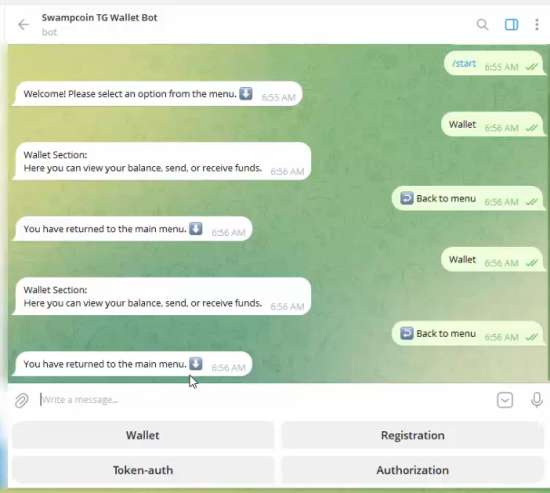
- Registration – run this command at the beginning to register in the bot wallet.
- Authorization – authorization by address and private key. And also for when you need to link an account in the bot to another TG account or WEB-wallet account and(or) Discord-bot.
- Token–auth – quick authorization by token (which you can receive with the command: /get_token on Discord) to link account to Discord-bot.
- Wallet – open sub-menu for wallet operations commands.
Sub-Menu: “Wallet”
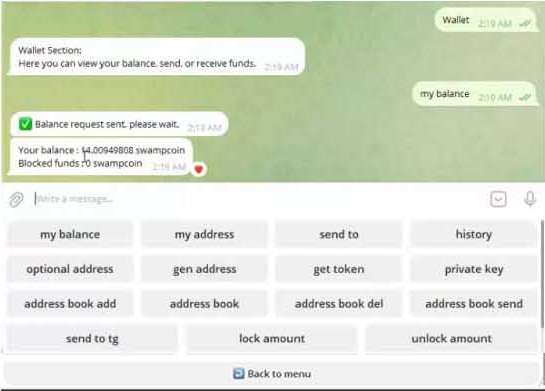
- my balance – bot will send you the number of coins on your balance and the number of locked coins.
- my address – bot will send you your main address.
- send to – enter to send coins, enter the address and the summa of coins and press enter, after sending the bot will send you a TX-ID in response. When you send coins – small fee of 0.00025 coins is charged.
- history – enter to receive and transaction history (history is recorded – only for the main address!)
- optional addresses – shows additional addresses you have added.
- gen address – create an additional address that will be linked to your account (you can add up to 20 of these addresses). When you receive coins to this address, the coins are automatically sent to your main address. A small fee of 0.00025 coins is charged.
- get token – get token for authorization on another TG account and (or) WEB-wallet and (or) on Discord wallet-bot.
- private key – get private key from main address. With this key you can add to your local core wallet and use 1 address on 2 wallets at the same time.
- address book add – command to add addresses with a specific name for quick access, entries can also be deleted and new ones added in their place. Each user can have up to 20 entries in the address book at a time.
- address book – to display entries in the address book.
- address book del – to delete entries from the address book, to delete you need to enter ID-contact. ID-contact – for all your entries you can see by the command – address book.
- address book send – to send coins to saved entries in the address book. To send coins, enter “label” – the name of the entry saved in the address book.
- send to tg – send coins to a user by name in Telegram.
- lock amount – locks the amount of coins you specify against spending. This is done by sending them to a new address associated with your account.
- unlock amount – returns previously blocked coins to the main address. small fee of 0.00025 coins is charged.
P.S.
Telegram Bot-wallet is fully custodial service. It is designed as mobile solution for quick introduction of users to our coin.
It is not recommended to store significant amounts on it.
Always remember: the coins are completely yours when only you own the private keys (or seed phrase).